SyncTree: A Lightweight, State-Driven Git Client
Git is an essential tool for teamwork and development, but the learning curve can be steep for beginners. Existing graphical clients often pack too many features into a single view, creating visual clutter. I wanted a tool that handles version control with zero mental overhead.
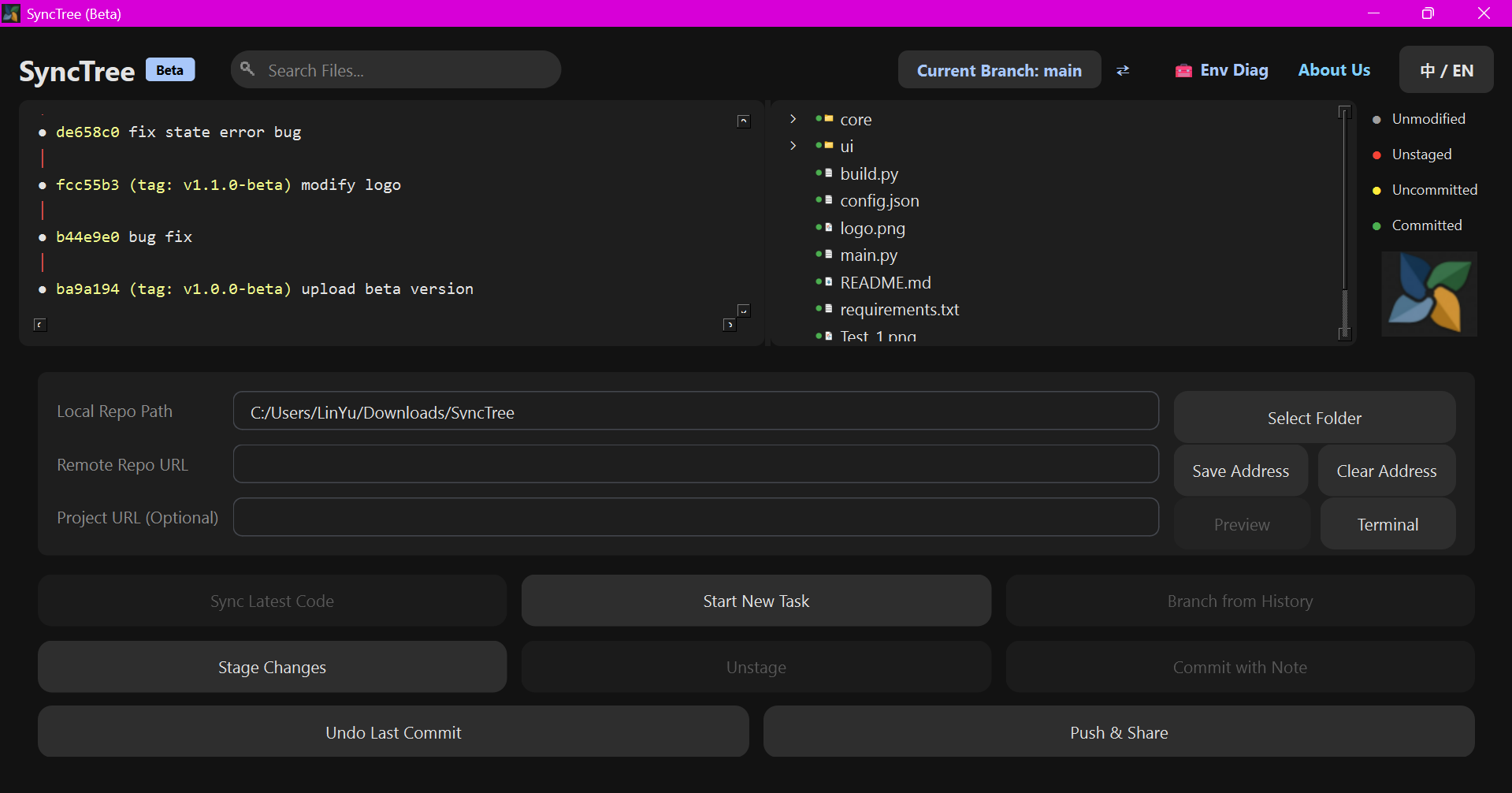
This led me to develop SyncTree. It is a lightweight Git desktop client built with PySide6, designed specifically to prevent user errors through strict state validation.
Core Design Choices
When planning SyncTree, I focused on error prevention and a clean visual hierarchy:
- State-Driven Interaction: SyncTree uses a strict state machine polling mechanism via
QTimer. If a Git operation does not match the current repository state, the corresponding UI button is automatically disabled and grayed out. This prevents invalid command combinations entirely. - Custom Dark Interface: I built a Material You dark theme. Instead of relying on standard system dialogs, the application uses custom modal windows with blurred backgrounds and lightweight bottom toast notifications.
- Git Graph Rendering: The client parses ANSI terminal color escape codes from the native
git logoutput. It then maps these codes to Unicode monospace geometric characters (like●and│) to draw the commit tree directly in the UI.
Automation and Diagnostics
To improve daily workflows, I integrated several background utilities:
- Pull Request Detection: When pushing code, the application runs background checks to detect Pull Request or Merge Request URLs generated by GitHub or GitLab. It then opens these links in your default browser.
- Network Diagnostics: If a sync or push operation fails, a diagnostic thread automatically pings loopback adapters and tests network API resolution to help identify connectivity issues or firewall blocks.
- Localization: The UI supports multiple languages (EN/CN) through a standalone
i18nmodule that updates UI text dynamically.
Technology Stack
The project is kept intentionally minimal, relying on the following tools:
- Python 3.10+: The core logic layer.
- PySide6: Used for the graphical interface and animations.
- Subprocess Module: Handles all communication with the Git executable. I configured
CREATE_NO_WINDOWon all subprocess calls to prevent command prompt windows from flashing, which keeps the experience clean on Windows 11.
Project Structure
Here is a breakdown of the repository layout and its core responsibilities:
SimpleG/
├── requirements.txt      # Dependency package list
├── build.py              # PyInstaller packaging & build script
├── main.py               # Project application entry point
├── core/
│   ├── config.py         # User local configuration & persistence
│   ├── git_actions.py    # Specific execution strategies & command structures
│   ├── git_utils.py      # Background QThread state polling & subprocess capturing
│   ├── i18n.py           # Internationalization language dictionaries
│   ├── network_diag.py   # Connectivity diagnostics thread utility
│   └── state.py          # Core Git data state definition Dataclass
└── ui/
    ├── components/
    │   ├── buttons.py    # Qt water ripple component redrawing
    │   ├── modals.py     # Modal windows, overlays, blur processing
    │   └── toast.py      # Lightweight message notification popup
    ├── graph_view.py     # View component dedicated to rendering Git Log ANSI and Unicode graphics
    ├── panel_view.py     # Lower 60% working pipeline area panel
    ├── theme.py          # Stylesheets, Theme color palettes
    └── window.py         # MainWindow main form glue layer
Running and Building Locally
If you want to test the application or build it yourself, you can do so easily in your terminal.
1. Setup
Make sure you have Git and Python 3.10+ installed.
git clone [https://github.com/AndrewWangDev/SyncTree](https://github.com/AndrewWangDev/SyncTree)
cd SyncTree
pip install -r requirements.txt
python main.py
2. Build a Standalone Executable
To package the client into a single .exe file:
python build.py
The compiled executable will be saved in the dist/synctree.exe directory.
SyncTree is open source and available under the GNU GPL v2.0. You can check out the source code or report issues on the GitHub repository.
讨论与反馈
登录后才能参与讨论
前往登录提 示
确定要删除这条评论吗?